MessageQueue.NET
MessageQueue.NET is a lightweight message queue with a REST API, written in C# on .NET 10. Senders and receivers never talk to each other directly: a message is stored in a queue until a receiver picks it up, and every message is processed by exactly one receiver.
-
Web API
Create queues by name, enqueue and dequeue messages, long polling, confirmations and limits.
-
.NET client
MessageQueueNET.Clientwraps the REST API and adds worker and app topic patterns. -
Command line tools
mqnetshell to inspect and fill queues,MessageQueueNET.Processorto run commands from a queue. -
Dashboard
Blazor dashboard to watch queues, browse messages and manage queue properties.
Overview
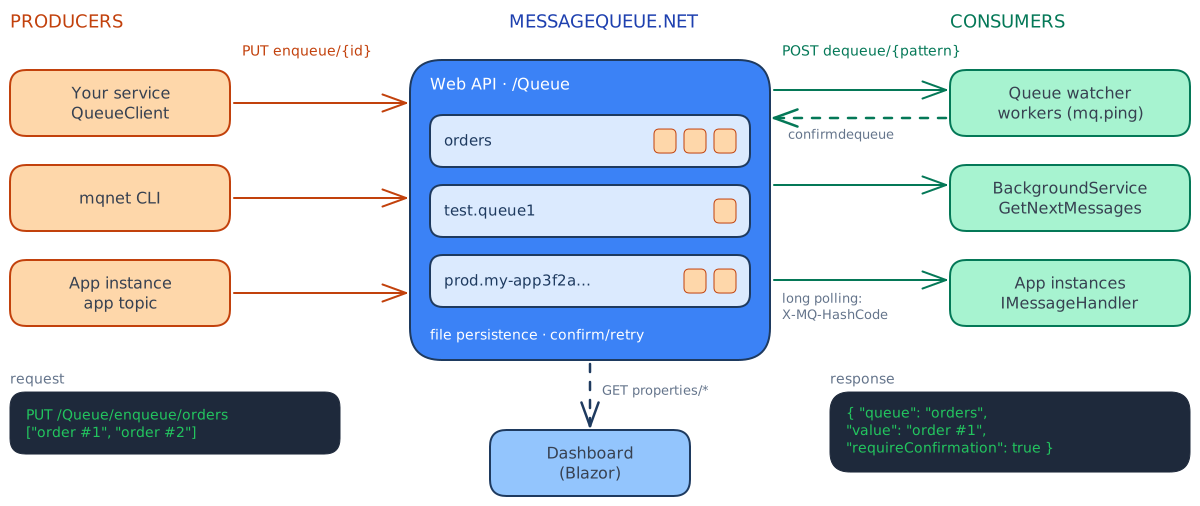
- Producers (applications, the command line tool) put messages into named queues.
- MessageQueue.NET keeps the queues in memory and optionally persists them to the file system.
- Consumers (workers, app instances, the processor) pick messages up. With a confirmation period, a message that is not confirmed in time goes back into the queue.
- The dashboard shows the state of one or more MessageQueue.NET servers.
Features
- Any number of queues, addressed by name or by pattern (
orders.*,queue1,queue2) - Long polling: consumers wait for new messages instead of polling in a loop
- Confirmations: messages are re-queued if processing is not confirmed in time
- Queue and message lifetimes, suspend enqueue/dequeue, limits against resource exhaustion
- In-memory queues with optional file system persistence
- Basic authentication with the roles
read,writeandadmin - OpenAPI description and Scalar UI
- Docker images, ZIP packages, NuGet packages, a .NET tool and an Aspire integration
Packages
| Package | Description |
|---|---|
MessageQueueNET.Client |
.NET client, queue worker and app topic services |
MessageQueueNET.Core |
Shared models and abstractions |
MessageQueueNET.Worker |
Ready-made command line workers (used by MessageQueueNET.Processor) |
MessageQueueNET.Aspire.Hosting |
Aspire resources for the server and the dashboard |
MessageQueueNET.Cmd |
.NET tool mqnet |
ghcr.io/jugstalt/messagequeue-net |
Docker image of the REST API |
ghcr.io/jugstalt/messagequeue-net-dashboard |
Docker image of the dashboard |
Next steps
- Install the server and the dashboard.
- Configure persistence, limits and authentication.
- Use the REST API or the .NET client.
- Build workers with the queue worker pattern or keep app instances in sync with the app topic pattern.