REST API
Scripts and CI pipelines use the REST API under /api/v1 to run workflows, look at executions and deploy workflows. The API has its own keys; it never uses the login of the UI.
API keys
Create keys on the page API keys (navigation). A key has:
| Setting | Meaning |
|---|---|
| Name | Who or what uses it, e.g. CI Deploy. Runs started with the key show API · CI Deploy in the history. |
| Rights | Read: workflows, executions, groups. Run: start, stop, replay runs. Deploy: create, change, delete, activate workflows. Portal: only the portal endpoints, for the user portal; use it alone. |
| Only these groups | Limits the key to the workflows of these groups. It doesn't see other workflows at all, also not workflows without a group. |
| Expires | After this day the key is refused. Empty: never. |
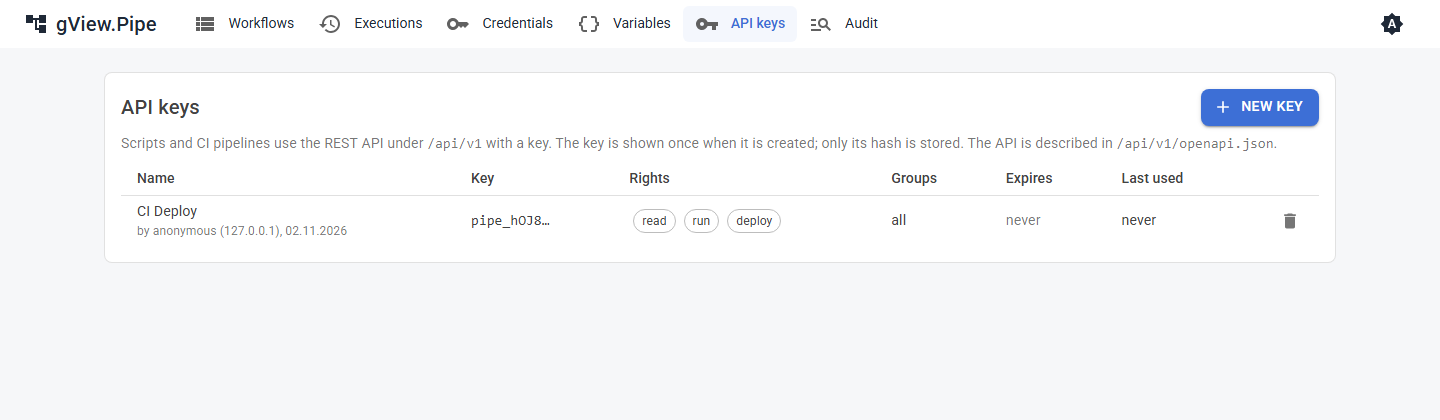
The key (pipe_…) is shown once, when it is created. Only its SHA-256 is stored (data/api-keys.json), so a lost key can't be shown again: delete it and create a new one. The prefix pipe_ lets secret scanners, e.g. of GitHub, recognize keys that were committed by mistake.
Send the key as a header:
X-Pipe-Api-Key: pipe_…
or as Authorization: Bearer pipe_….
Warning
Only users with the role admin can create keys. With Pipe:Auth:Mode none everyone who can reach the UI is admin. Protect the UI with a login before you rely on keys. More than 60 failed attempts per minute from one address answer 429.
Endpoints
The API is described in /api/v1/openapi.json (OpenAPI 3). Load it into a tool of your choice, e.g. Postman, Bruno or an OpenAPI viewer, to try the endpoints.
| Method and path | Right | Does |
|---|---|---|
GET /api/v1/workflows |
read | Lists the workflows. |
GET /api/v1/workflows/{id} |
read | The workflow as JSON, with its version as ETag. |
PUT /api/v1/workflows/{id} |
deploy | Creates or replaces the workflow (see below). |
DELETE /api/v1/workflows/{id} |
deploy | Deletes the workflow. |
POST /api/v1/workflows/{id}/activate, /deactivate |
deploy | Switches its triggers on or off. |
POST /api/v1/workflows/{id}/run |
run | Starts a run (see below). |
GET /api/v1/executions |
read | Executions, newest first. Filters: workflowId, status, mode, from, before, limit. |
GET /api/v1/executions/{workflowId}/{id} |
read | One execution with the input, output and logs of each node. |
POST /api/v1/executions/{workflowId}/{id}/cancel |
run | Stops a running or queued run. |
POST /api/v1/executions/{workflowId}/{id}/replay |
run | Runs the execution again; body { "fromNodeId": "…" } to start at a node (Replay). |
GET /api/v1/groups |
read | Lists the workflow groups. |
GET /api/v1/audit |
read | The audit log, newest first. Filters: from, before, actor, area, objectId, limit. Only for keys that aren't limited to groups. |
Errors are answered as application/problem+json with a title that says what is wrong.
Running a workflow
POST /api/v1/workflows/{id}/run
{ "items": [ { "name": "Ada" } ], "environment": "TEST", "wait": true, "timeoutSeconds": 30 }
All fields are optional. The run starts at every node without an incoming connection, with items as their input (default: one empty item). It behaves like a triggered run: pinned data is ignored, the error workflow starts on failure and the queue of the workflow applies (Max queued runs).
| Answer | When |
|---|---|
200 { executionId, status, error, errorNode, node, items } |
wait and the run ended in time; items is the output of the node that finished last. A failed run is also 200, with status: "error". |
202 { executionId, status } |
Without wait, or the run takes longer than timeoutSeconds; ask GET /executions/{workflowId}/{executionId} later. |
429 |
The workflow runs already and its queue is full. |
Deploying a workflow
PUT /api/v1/workflows/{id} takes the JSON of a workflow, as GET returns it or as stored in data/workflows. Before saving it is checked: unique node ids and names, connections between existing nodes, no cycles, installed node types, valid parameters. Problems answer 422 with a list in details.errors. Credentials that don't exist on this server are details.warnings in the answer, not errors.
Send If-Match with the ETag of a GET to make sure nobody changed the workflow in between; otherwise you get 412. Without If-Match the workflow is replaced. If the workflow is active, its triggers are armed again with the new version.
Examples
KEY=pipe_...
# run and wait for the result
curl -s -X POST https://pipe.example.com/api/v1/workflows/hello-pipe/run \
  -H "X-Pipe-Api-Key: $KEY" -H "Content-Type: application/json" \
  -d '{ "items": [ { "name": "Ada" } ], "wait": true }'

# deploy a workflow from a file
curl -s -X PUT https://pipe.example.com/api/v1/workflows/hello-pipe \
  -H "X-Pipe-Api-Key: $KEY" -H "Content-Type: application/json" \
  --data-binary @hello-pipe.json

# the last failed runs
curl -s "https://pipe.example.com/api/v1/executions?status=error&limit=10" -H "X-Pipe-Api-Key: $KEY"
$headers = @{ "X-Pipe-Api-Key" = "pipe_..." }
# run and wait for the result
$body = @{ items = @(@{ name = "Ada" }); wait = $true } | ConvertTo-Json -Depth 5
Invoke-RestMethod -Method Post -Uri https://pipe.example.com/api/v1/workflows/hello-pipe/run `
  -Headers $headers -ContentType "application/json" -Body $body

# deploy a workflow from a file
Invoke-RestMethod -Method Put -Uri https://pipe.example.com/api/v1/workflows/hello-pipe `
  -Headers $headers -ContentType "application/json" -InFile hello-pipe.json

# the last failed runs
Invoke-RestMethod -Uri "https://pipe.example.com/api/v1/executions?status=error&limit=10" -Headers $headers
Credentials, variables and groups can't be changed through the API; set them up in the UI.
Portal endpoints
For the user portal (users who run workflows, but don't edit them) a key with the right Portal reaches only /api/v1/portal. It cannot do anything else, and no other key reaches these endpoints. Every request names the user it is for in the header X-Pipe-On-Behalf-Of, and may list the portal roles of the user in X-Pipe-On-Behalf-Of-Roles (each role percent-encoded, separated by commas); runs show portal:<user> as the starter, and users see and stop only their own runs. The portal server is trusted to name the right user, so keep the key on that server and let only it reach the backend.
| Method and path | Does |
|---|---|
GET /api/v1/portal/workflows |
The published workflows with category, form and run settings. |
POST /api/v1/portal/workflows/{id}/run |
Starts a run. Body { "values": { … }, "mode": "wait" or "background" }. The values are checked against the form (422 with the fields that are wrong). Waiting answers with the result, or 202 when the wait timeout passed. |
GET /api/v1/portal/executions |
The runs of the user, newest first, with the running ones. |
GET /api/v1/portal/executions/{workflowId}/{id} |
Status and result of a run of the user. |
POST /api/v1/portal/executions/{workflowId}/{id}/cancel |
Stops a run of the user, unless the workflow forbids it. |
Which workflows appear is set in the workflow settings: only workflows with Publish in portal are visible, in the category of their group. The Form Trigger declares the form, the Result node what the user sees at the end. Users never see raw items or error details of nodes: a failed run shows the Error message of the Result node, or a general text with the number of the run.
Each field of the form has a name, a type (text, multiline text, number, yes/no, date, choice, password), a label, a description, a placeholder, a default and Required. Text fields can have a pattern, a regular expression the text must match as a whole (e.g. [A-Z]{1,2}-\d{1,5}), with the message shown otherwise. The portal can check it while the user types; the backend checks it again on every start. Keep patterns to what .NET and JavaScript share.
Settings of the backend for the portal (section Pipe:Portal):
| Setting | Meaning |
|---|---|
MaxRunsPerUser |
Runs a user may have at the same time (default 3, 0 = no limit); more are answered with 429. |
HistoryDays |
Days the result and the entered values of a run are kept for the user (default 30, 0 = always); after that only the status is shown. |
NotifyWorkflowId |
The workflow that sends the mail when a run is done. Without it the portal offers no mail. |
PublicUrl |
The address of the portal, for the link in that mail. |
GET /api/v1/portal/info tells the portal whether a mail can be sent (mailWhenDone) and the days kept (historyDays). notifyEmail in the body of a run asks for the mail.