Items and expressions
Items
Data flows through a workflow as items. An item is a JSON object, plus optional binary attachments (files). A connection carries a list of items, and a node receives all items of its inputs at once.
{ "id": 1, "customer": "Ada", "total": 120, "country": "AT" }
Most nodes process each item on its own: the Set node adds fields to every item, If sends each item to true or false. A few nodes work on the whole list: Aggregate collects many items into one, Split Out turns one item into many, Limit and Sort change the list.
Items are copied on their way into a node, so parallel branches can't change each other's data.
Expressions
Any text parameter can contain expressions in double curly braces. The content is JavaScript:
Hello {{ $json.customer }}, your total is {{ $json.total * 1.2 }} EUR
- A parameter that consists of one expression keeps the type of the result:
{{ $json.total * 1.2 }}is a number,{{ $json.tags }}an array. - With text around the expressions, the result is text.
- Expressions run once per item, with that item as
$json.
Variables
| Variable | Meaning |
|---|---|
$json |
The JSON of the current item. |
$itemIndex |
The position of the current item in the list (from 0). |
$input.first(), $input.all() |
The first item or all items of the node's input. |
$node["Name"].json |
The first item that the node Name produced. .all is the list of all its items. |
$workflow |
Id and name of the workflow. |
$execution |
Id of the current run. |
$now |
The current time as ISO text. |
$vars.NAME |
A variable of the workflow, its group or the instance, see Variables and environments. |
$environment |
The environment of the run, for example PROD. |
There is no $env: the environment variables of the server often contain secrets. Use variables for shared values and credentials for secrets.
Examples
| Goal | Expression |
|---|---|
| A nested field | {{ $json.address.city }} |
| Safe access when the field may be missing | {{ $json.address?.city ?? 'unknown' }} |
| Calculate | {{ Math.round($json.total * 1.2 * 100) / 100 }} |
| Join text | {{ $json.first + ' ' + $json.last }} |
| Condition | {{ $json.total > 100 ? 'big' : 'small' }} |
| Data of an earlier node | {{ $node["Products"].json.name }} |
| Webhook body | {{ $json.body?.name ?? 'stranger' }} |
| Count the items | {{ $input.all().length }} |
Warning
Accessing a field of something that doesn't exist is an error, as in JavaScript: $json.missing.deeper fails if missing isn't there. Use ?.: $json.missing?.deeper.
Values are copied into the expression: changing $json inside an expression doesn't change the item. Expressions can't use the network or files and are stopped after one second.
The editor helps
Autocomplete: inside {{ }} the field suggests what you can write: the fields of the node's input ($json.…), the output of earlier nodes ($node["Name"].json.…), the variables of the environment ($vars.…, secret ones without their value) and the global names ($now, $workflow, …). Each suggestion shows its type and a sample value from the last run.
- The list opens after
{{,.and[", or with Ctrl+Space. - ↑ ↓ choose, Enter or Tab inserts, Esc closes.
- Typing
{{adds the closing}}. - The fields come from the run shown in the editor, or from pinned data. Without one, run the workflow once or use Run to here on the node before.
- Code fields (the Code node) offer the same, plus
items[0].…in All items mode.
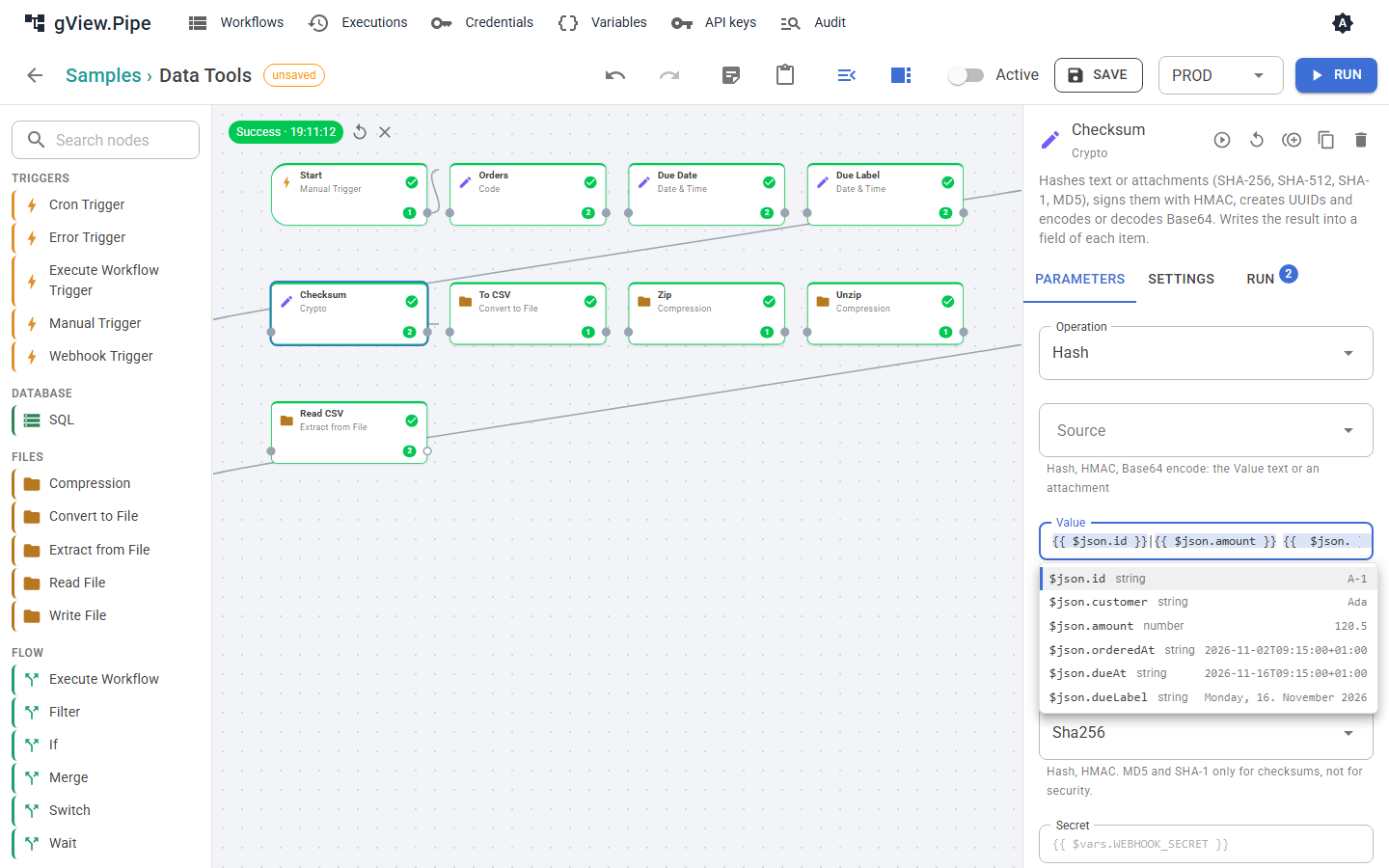
Below the field, = … shows the value of the expression for the first input item of the last run.
In the Run tab of a node, click a field of the input to put the matching expression into the parameter you edited last.
The Code node
For anything larger than an expression, the Code node runs JavaScript. It has two modes:
- All items: your code gets
items(an array with the JSON of all input items) and returns an array of objects, which become the output items. - Each item: your code runs once per item with
$jsonand returns an object, ornullto drop the item.
// mode: all items
const orders = items.filter(order => order.total > 100);
console.log(`${orders.length} big orders`);
return orders.map(order => ({ ...order, big: true }));
// mode: each item
if ($json.country === 'DE') return null;
return { ...$json, vat: $json.total * 0.2 };
console.logwrites to the Logs of the node.- The variables of expressions (
$node,$workflow,$now, …) are available. - The code is not scanned for
{{ }}; write plain JavaScript. - A Code node may run up to 30 seconds. It can't use the network or files: use the HTTP Request or Read File nodes for that.
- Attachments of an item are kept when the number of items stays the same.
Attachments
Files (for example from a webhook upload or the Read File node) travel with the item as binary attachments by name. They are not part of the JSON. Nodes such as Write File and Send Email can use them. The bytes of attachments exist only while the execution runs; in the history you see that an attachment existed, but can't download it afterwards.