Triggers and webhooks
A trigger is the first node of a workflow. It decides when the workflow starts.
| Trigger | Starts the workflow |
|---|---|
| Manual Trigger | When you run it in the editor. |
| Cron Trigger | On a schedule (5 or 6 field cron expression), while the workflow is active. |
| Webhook Trigger | When its URL is called, while the workflow is active. |
| Execute Workflow Trigger | When another workflow calls this one with the Execute Workflow node. |
| Error Trigger | When a run of another workflow fails (see Error handling). |
Webhook Trigger
A Webhook Trigger makes the workflow callable at
<server address>/webhook/<path>
The editor shows the exact URL as a hint next to the parameters.
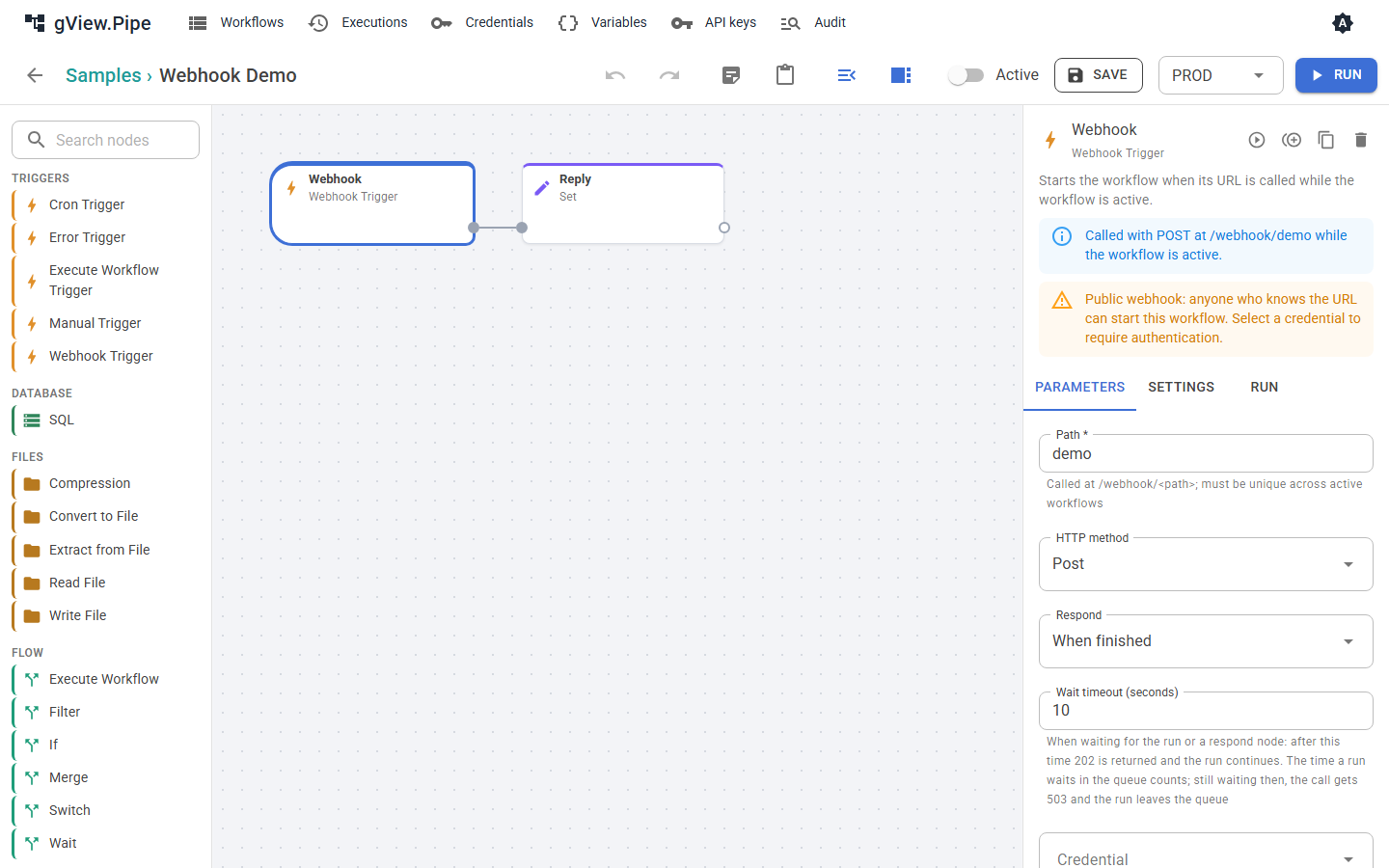
| Parameter | Meaning |
|---|---|
| Path | Letters, digits, _, - and /, lower case. Must be unique across all active workflows. A random path is suggested for a new node. |
| HTTP method | POST by default, or GET, PUT, PATCH, DELETE, or any method. |
| Respond | When and how the caller gets an answer (see below). |
| Wait timeout (seconds) | How long the caller waits in the modes that wait. After that the caller gets 202 and the run goes on. |
| Credential | Basic Auth, Bearer Token or API Key Header. Without one, anyone who knows the URL can start the workflow. |
Warning
A webhook without a credential is public. The editor warns you about it.
The request as an item
The trigger turns the call into one item:
{
  "method": "POST",
  "path": "orders/new",
  "query": { "id": "7" },
  "headers": { "content-type": "application/json" },
  "body": { "customer": "ACME" },
  "receivedAt": "2026-11-01T10:15:00.0000000+00:00"
}
- A JSON body (
Content-Typecontainsjson) becomes an object inbody. Form fields become an object. Any other body is text. - Uploaded files become binary attachments of the item.
- The headers
authorization,proxy-authorization,cookieand the API key header are removed, so secrets never end up in the execution history. - Bodies larger than 10 MB are rejected with
413.
Answering the caller
The Respond parameter decides what the caller receives.
| Mode | The caller gets |
|---|---|
| Immediately | 202 with { "executionId": …, "status": "started" } straight away. The workflow runs in the background. Whether it succeeds is not reported to the caller. |
| When finished | The items of the node that finished last: one item as an object, several as an array. If the run fails, the caller gets 500. |
| Using respond node | The answer of a Respond to Webhook node in the workflow. |
In both waiting modes the caller gets 202 with "status": "running" when the run takes longer than the timeout. The run is never canceled when the caller disconnects.
When the workflow is busy and has a queue (Max queued runs in the workflow panel), the run waits for a free slot. Immediately then answers "status": "queued". In the waiting modes the time in the queue counts against the timeout: if the run still waits when it passes, the caller gets 503 with Retry-After and the run leaves the queue.
Respond to Webhook
The Respond to Webhook node sends the answer in the mode Using respond node. It lets you choose the status code, headers and body:
| Parameter | Meaning |
|---|---|
| Respond with | The first item, all items as an array, a custom body or no body. |
| Body | For custom body: JSON or an expression, evaluated against the first item. |
| Status code | 100 to 599. Supports expressions. |
| Headers | Optional response headers. A text body with a non-JSON Content-Type (for example text/html) is sent as is. |
The items pass through the node, so the workflow can continue after it has answered.
Important
The answer only exists if a Respond to Webhook node runs. When a node before it fails with the error mode Stop the execution, the run ends there, the Respond node never runs, and the caller gets 500 with the error message. To answer in a failure case too, see Answering a webhook after a failure.
Status codes
| Code | Reason |
|---|---|
| 200 | Answer of the workflow (When finished) or of a Respond to Webhook node. |
| 202 | Started or queued (Immediately), or the timeout passed while the run goes on. |
| 400 | The header X-Pipe-Environment names an environment the workflow doesn't allow. |
| 401 | The credential is missing or wrong. |
| 404 | No active webhook at this path. |
| 405 | The method does not match the trigger. |
| 413 | The body is too large. |
| 429 | The workflow is already running, its limit of concurrent runs is reached (default 1) and its queue is full or off. |
| 503 | The run still waited in the queue when the timeout passed; it was taken out of the queue. Try again after Retry-After seconds. |
| 500 | The run failed, or ended without reaching a Respond to Webhook node. The body contains the error and the execution id. |
The 500 body looks like { "error": "…", "executionId": "…" }. Look the execution id up in the execution history to see which node failed.
Choosing the environment
A webhook run uses the effective environment of the workflow (see Variables and environments). To let callers choose another one, for example to test a system against the test database, list it under Webhook callers may choose in the workflow panel. The caller then sends the header:
X-Pipe-Environment: TEST
An environment that isn't listed is rejected with 400, never silently replaced. The header is checked after the credential, so a caller without access learns nothing about the environments.
Try it
curl -i -X POST http://localhost:5240/webhook/demo -H "Content-Type: application/json" -d '{"name":"Ada"}'
In Windows PowerShell, Invoke-RestMethod hides the body of an error answer. Use curl.exe -i (with -k for the development certificate on https://localhost:7240) to see the status code and the body.