Failure notifications
When a scheduled or webhook-triggered workflow fails, nobody is watching the editor. An error workflow can send a message instead: a mail, a Teams post or a Slack message. The samples group contains one for each.
| Sample | Sends | Needs |
|---|---|---|
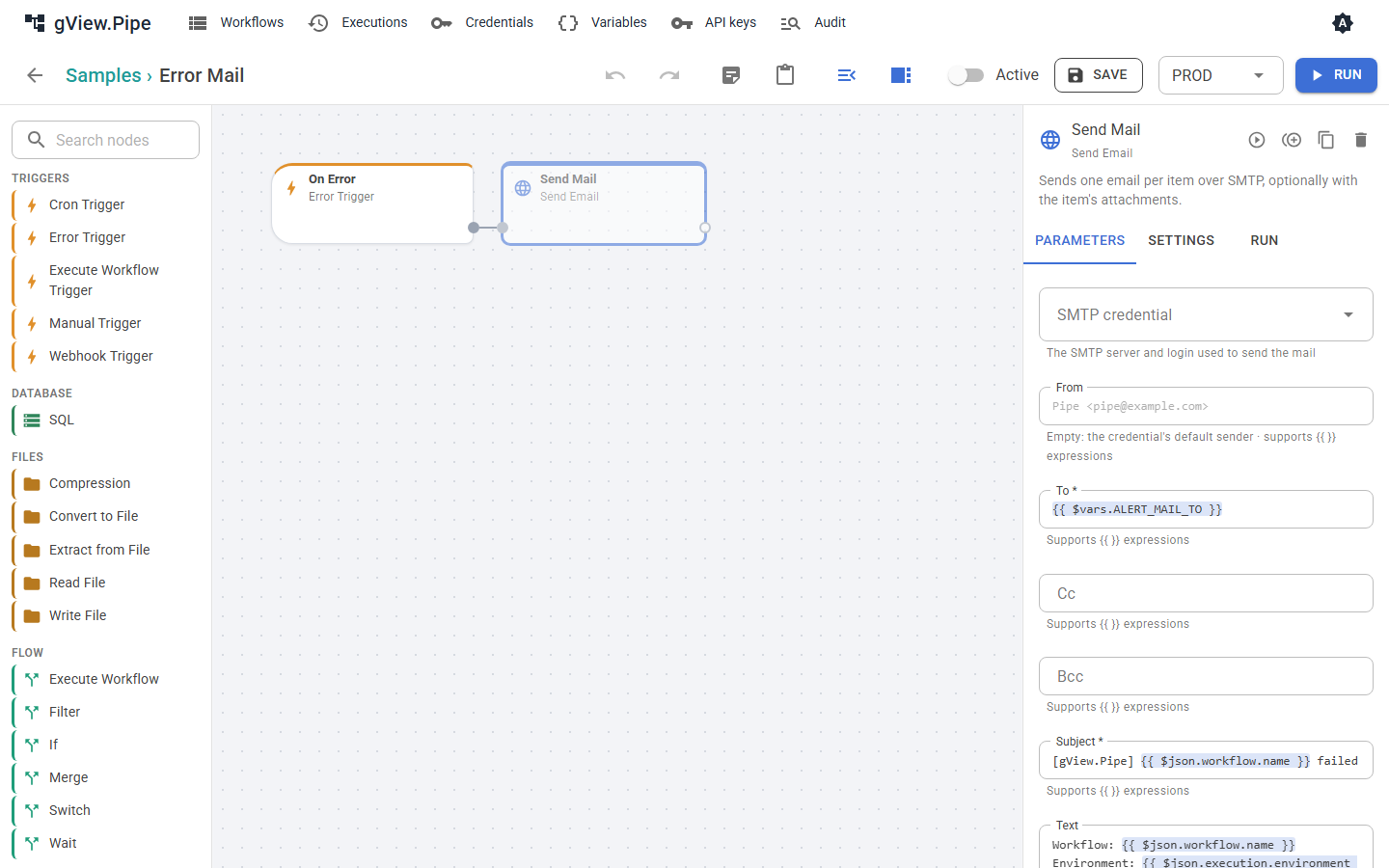
| Error Mail | a mail with workflow, environment, node, error and a link | an SMTP credential and the variable ALERT_MAIL_TO |
| Error Teams | an Adaptive Card to a Teams channel | the secret variable ALERT_TEAMS_URL |
| Error Slack | a message to a Slack channel | the secret variable ALERT_SLACK_URL |
| Error Alerts | a line in the application log | nothing |
Setting up
- Open the sample, for example Error Mail. Its sending node is disabled so that a fresh installation sends nothing.
- Set what it needs:
- Error Mail: choose the SMTP credential in the node Send Mail, and define the variable
ALERT_MAIL_TO(one or more addresses, separated by commas) on the Variables page. Different values per environment are possible, for example a team mailbox forPROD. - Error Teams: in Teams, add the workflow Post to a channel when a webhook request is received to the channel and copy its URL. Define it as the secret variable
ALERT_TEAMS_URL. - Error Slack: create an incoming webhook in your Slack app and define its URL as the secret variable
ALERT_SLACK_URL.
- Error Mail: choose the SMTP credential in the node Send Mail, and define the variable
- Enable the sending node (select it, Settings, switch off Disabled) and save.
-
Choose the error workflow where it should apply:
- for one workflow: Error workflow in its workflow panel;
- for a group: Error workflow in the group dialog (pencil on the group tile);
- for all workflows:
Pipe:ErrorWorkflowIdinpipe.config, for example"error-mail"(Configuration).
A workflow uses the first one set on workflow → group → instance. None on a workflow switches notifications off for it, for example for a test workflow. 5. Ask the administrator to set
Pipe:PublicUrlto the address users open the app at. Then the messages contain a link to the failed run.
Copy a sample rather than editing it when you need several variants, for example different recipients per group.
How often messages are sent
The Throttle minutes of the Error Trigger (default 15) limit the messages per failed workflow: after a message, further failures of the same workflow are only counted for that time. The next message says how many there were (suppressed). A workflow that fails every minute therefore sends one message per quarter of an hour, not 15. Set 0 to get every failure.
Other things that keep the noise down:
- Runs you start in the editor never send messages.
- A failing sub-workflow is reported once, by the workflow that called it; the message names the sub-workflow and its failed node.
- A node with Continue or Error output doesn't fail the run, so it isn't reported. Send a message from its
errorbranch if you need one (Error handling).
Back to normal
An alarm should also end. Put a Recovery Trigger into the same workflow as the Error Trigger and connect it to a message, like the second branch of the three samples (disabled until you set them up). It starts when a workflow that failed runs successfully again.
- It only reports a recovery when a failure was reported before: if the throttle swallowed all failures, or no error workflow applied, nobody hears about the recovery either.
- Only runs by trigger, replay or the API count. A run you start in the editor neither starts nor ends a failure.
- The state is kept on disk (
data/health), so it survives a restart. - The item is
{ workflow, execution, failedSince, failedExecution, failures };execution.urlandfailedExecution.urllink to the runs withPipe:PublicUrl.
| Expression | Value |
|---|---|
{{ $json.failedSince }} |
start of the first failed run |
{{ $json.failures }} |
failed runs since then, reported or not |
Trying it out
Start the developer containers with Mailpit (ADD_MAILPIT in the AppHost, see the Developer Guide) and create an SMTP credential for localhost, port 1025, without TLS. Set up Error Mail with it, make a workflow with a Cron or Webhook Trigger fail (for example a Code node with throw new Error('test')), and let it run by its trigger or replay a failed run. The mail appears at http://localhost:8025.
Writing your own
Any workflow that starts with an Error Trigger is an error workflow. Its item is described in Error handling. Useful expressions:
| Expression | Value |
|---|---|
{{ $json.workflow.name }} |
name of the failed workflow |
{{ $json.execution.environment }} |
environment of the run, for example PROD |
{{ $json.node?.name ?? '-' }} |
the failed node, if known |
{{ $json.execution.error }} |
the error message |
{{ $json.execution.url ?? '' }} |
link to the run (with Pipe:PublicUrl) |
{{ $json.suppressed }} |
failures not reported since the last message |